
Hosted mode
Hosted mode is v8s server: one self-hosted, multi-user deployment that serves the v8s web app to desktop and phone browsers. People sign in with your identity provider, and v8s reaches each cluster as that person, not as a shared admin.
Self-hosted only
There is no v8s cloud service. You run v8s server in your own infrastructure, where it can reach your clusters or your access gateway.
When to use it
Use hosted mode when:
- A team wants one URL for Problems, Flux, and Helm, including from a phone, with no install.
- Clusters are reachable from a place you can run a server (a management cluster, a VM), but not from every laptop.
- You already have an identity provider (Entra ID, Keycloak, Okta, Google, Dex, GitLab) that your clusters or your gateway trust.
Use the desktop app or v8s serve for personal use. They use your own kubeconfig and need no server. Exec plugins (kubelogin, aws) only work there: a server has no user machine, so hosted mode does the equivalent OIDC flow on the server.
How it works
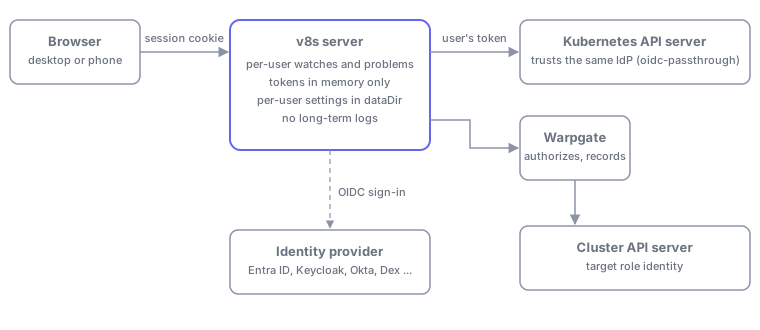
- A person opens the v8s URL and signs in with OIDC.
- v8s sets a host-only session cookie. The IdP tokens stay on the server, in memory.
- The person picks clusters. v8s starts that person's own watches on those clusters, carrying their own token, to the API server or to Warpgate.
- v8s sends the UI only the rows it is showing, like the desktop app.
Nothing is watched on behalf of someone who is not looking. A user's watches start when they select a cluster and stop 30 seconds after their last browser tab closes or deselects it. There is no background alerting, so Problems are computed only while someone has v8s open.
Identity strategies
Each cluster has one strategy for how v8s authenticates as the user.
| Strategy | When to use | What v8s holds |
|---|---|---|
oidc-passthrough (default) | The API server or gateway trusts the same IdP. Covers Warpgate targets, clusters with AuthenticationConfiguration or --oidc-* flags, EKS with an OIDC provider, AKS with Entra | Nothing per cluster. Only the cluster app credential (below) |
impersonation | A directly reached cluster cannot trust your IdP | A scoped ServiceAccount token with impersonate |
kiosk | A read-only wallboard for everyone | A read-only token. All mutations, shells, logs, drains, and Helm actions are disabled |
Prefer oidc-passthrough. With it, everything is per user: lists, watches, problems, and writes all carry the user's own token, so Kubernetes RBAC and your gateway's records are accurate.
Impersonation is admin-equivalent if the credential leaks
Limit impersonate on groups with resourceNames to an explicit allowlist, and never allow system:masters, any system: group, or serviceaccounts. v8s also enforces its own rules, see Impersonation rules. Use it only where you must.
Configuration file
v8s server --config /etc/v8s/config.yaml reads one YAML file. Unknown keys are errors, so typos fail at startup, and so do invalid values. Durations are strings such as 30m or 12h.
Secret references
Secrets are never inline. Anywhere a secret is needed, write a reference with exactly one of:
clientSecret:
    env: V8S_OIDC_CLIENT_SECRET # an environment variable
# or
clientSecret:
    file: /etc/v8s/oidc-secret # a file
Surrounding whitespace is trimmed, and an empty value is an error. OIDC client secrets, private keys, and the correlation key are read once at startup, so a bad reference stops the server before it serves anything. Impersonation and kiosk tokens are re-read from their file or variable at most every 30 seconds, so projected ServiceAccount tokens can rotate without a restart.
Top level
| Key | Meaning | Default |
|---|---|---|
listen | Address to listen on | :7931 |
publicUrl | The external origin, for example https://v8s.example.com. https required (http only for localhost, 127.0.0.1, ::1). No path or query. A default port and a trailing slash are normalized away | required |
dataDir | Directory for the per-user settings files, the only state written to disk (see Storage) | /var/lib/v8s |
session | Session limits, below | |
oidc | The login provider: v8s's own sign-in, below | required |
clusterApp | The app registration whose ID token clusters receive, below. Required if any cluster uses oidc-passthrough | |
clusters | The cluster records, below | |
adminGroups | IdP groups that can see every cluster | none |
limits | Request limits, below | as listed |
correlationKey | Secret reference that keys the correlation id sent to clusters. Random per start if unset, so ids do not match across restarts | random |
session
| Key | Meaning | Default |
|---|---|---|
lifetime | Absolute session length | 12h |
idleTimeout | Sign-out after this long with no open tab | 30m |
maxPerUser | Concurrent sessions per user | 5 |
lifetime and idleTimeout must each be at least 1m. Sessions are held in memory, so a restart signs everyone out.
oidc
The login provider. Redirect URI to register: <publicUrl>/auth/callback. In Entra ID, the platform depends on the credential: see Which Entra platform to register.
| Key | Meaning | Default |
|---|---|---|
issuer | OIDC issuer URL. https required (http only for localhost) | required |
clientId | Client ID of the login app | required |
publicClient | true for an app with no credential: PKCE only. See Which Entra platform to register | false |
clientSecret | Secret reference. Set exactly one of clientSecret and privateKey, unless publicClient is true | |
privateKey | Secret reference to a PEM RSA private key (PKCS#1 or PKCS#8), for private_key_jwt client authentication | |
certificate | Secret reference to the PEM certificate matching privateKey. Sent as the x5t#S256 header, which Entra ID requires | none |
scopes | Scopes to request | [openid, profile, email] |
usernameClaim | ID token claim used as the user name. Falls back to a verified email, then to the subject | preferred_username |
groupsClaim | ID token claim that holds the user's groups | groups |
Pick a username claim that is unique and that users cannot edit. It becomes the impersonated user name on impersonation clusters.
clusterApp
The app registration whose ID token OIDC pass-through clusters receive. Redirect URI to register: <publicUrl>/auth/cluster-callback (not needed when it is the same app as oidc, see below).
| Key | Meaning | Default |
|---|---|---|
clientId | Client ID of the cluster app | required |
issuer | Issuer of the cluster app | the oidc.issuer |
publicClient | true for an app with no credential: PKCE only | false |
clientSecret | Secret reference. Set exactly one of clientSecret and privateKey, unless publicClient is true | |
privateKey | Secret reference to a PEM RSA private key | |
certificate | Secret reference to the matching PEM certificate (x5t#S256 header) | none |
scopes | Scopes to request | [openid, offline_access] |
After login, v8s runs a second authorization-code flow against this app, silently through the person's existing IdP session, and keeps the resulting ID token and refresh token in server memory. Tokens are refreshed in the background shortly before they expire.
The same app for login and clusters. If clusterApp.clientId equals oidc.clientId (and clusterApp.issuer is unset or equal to oidc.issuer), v8s does not run a second flow. The login tokens are the cluster tokens: v8s adds offline_access to the login scopes and reuses the ID and refresh tokens of the login. Use this when your clusters and gateway already trust the app registration that people sign in to v8s with. The clusterApp block only needs clientId in this mode; it needs no credential of its own, and its scopes are not used.
clusters
A list of cluster records.
| Key | Meaning | Default |
|---|---|---|
id | Unique identifier: lowercase letters, digits, ., _, -, starting and ending alphanumeric, at most 64 characters | required |
name | Display name | the id |
server | API server URL, or a gateway such as Warpgate. https required (http only for localhost) | required |
caData | CA bundle, PEM or base64 PEM as in a kubeconfig. Set at most one of caData and caFile | system roots |
caFile | Path to a CA bundle file | |
strategy | oidc-passthrough, impersonation, or kiosk | oidc-passthrough |
impersonation | Credential of the impersonation strategy, below. Only valid with that strategy | |
kiosk | Credential of the kiosk strategy, below. Only valid with that strategy | |
groups | IdP groups that may see this cluster. '*' means every signed-in user | none |
displayGroups | Selector groups the cluster is listed under | none |
A cluster with an empty groups list is an error unless adminGroups is set, because nobody could see it. A user sees a cluster if they belong to one of its groups, or to an adminGroups group.
impersonation and kiosk
| Key | Meaning | Default |
|---|---|---|
impersonation.token | Secret reference to the impersonator's bearer token. Required | |
impersonation.prefix | Mandatory prefix of the impersonated user name | v8s: |
impersonation.groupPrefix | Prefix added to every forwarded group | the prefix |
impersonation.groups | Allowlist of IdP group names to forward, matched on the raw name. Empty means forward all | all |
kiosk.token | Secret reference to a read-only bearer token. Required |
limits
| Key | Meaning | Default |
|---|---|---|
readQps | Read requests per second, per user and cluster | 20 |
readBurst | Read burst, per user and cluster | 40 |
clusterQps | Ceiling per cluster across all users | 100 |
clusterBurst | Burst ceiling per cluster | 200 |
Example: Entra ID, clusters and Warpgate trusting one app
This is the common setup. Your clusters and Warpgate already trust one Entra app registration, the one kubelogin uses. v8s signs people in with that same app and forwards the ID token it gets. Because oidc and clusterApp have the same clientId, v8s reuses the login tokens and never runs a second flow.
Which Entra platform to register
Entra asks for a platform when you add a redirect URI. The platform decides how the app proves itself when it trades the sign-in code for tokens:
| Platform | Meant for | At the token step | Use it for v8s when |
|---|---|---|---|
| Mobile and desktop applications | Public clients with no secret: CLIs (kubelogin), native apps | No credential; PKCE protects the code | The app has no secret or certificate (typical for a kubelogin app). publicClient: true |
| Web | Server apps that hold a credential | A client secret or certificate is required | The app has a secret or certificate you give v8s |
| Single-page application | JavaScript that gets tokens in the browser | Entra only accepts the exchange from a browser; refresh tokens last 24 h | Never: v8s exchanges codes on the server, so Entra rejects it |
Register the redirect URI
- In the Entra admin center, open App registrations, then the app your clusters and Warpgate trust.
- Go to Authentication and choose Add a platform (or Add URI under an existing platform of the right type).
- Pick Mobile and desktop applications for a public client, or Web if v8s gets a credential (see the table).
- Add the custom redirect URI
<publicUrl>/auth/callback, for examplehttps://v8s.example.com/auth/callback. Leave the suggestedmsal…andnativeclientURIs unchecked. - Save. Nothing else changes for
kubelogin: its device-code sign-in keeps working.
Configuration: public client (no secret)
listen: ':7931'
publicUrl: https://v8s.example.com
dataDir: /var/lib/v8s

session:
    lifetime: 12h
    idleTimeout: 30m

oidc:
    issuer: https://login.microsoftonline.com/<tenant-id>/v2.0
    clientId: <cluster-app-client-id> # the client ID your clusters and Warpgate trust
    publicClient: true # redirect URI under "Mobile and desktop applications"
    usernameClaim: preferred_username
    groupsClaim: groups

clusterApp:
    clientId: <cluster-app-client-id> # same as oidc.clientId: login tokens are reused

adminGroups:
    - <platform-admins-group-object-id>

clusters:
    - id: prod-eu
      name: Production EU
      server: https://prod-eu.example.com
      caFile: /etc/v8s/ca/prod-eu.crt
      groups: [<sre-group-object-id>]
      displayGroups: [production]

    - id: prod-eu-gw # a Warpgate target: just another OIDC endpoint
      name: Production EU (via Warpgate)
      server: https://warpgate.example.com:8888/prod-eu-operator
      groups: [<sre-group-object-id>, <dev-group-object-id>]
      displayGroups: [production]
With publicClient: true, v8s sends only client_id to the token endpoint, and PKCE binds each authorization code to the server that started the sign-in. It must be set explicitly: leaving out a secret by mistake is still a configuration error, and publicClient together with a secret, key, or certificate is rejected.
Configuration: app with a certificate or secret
If the app has a credential, register the redirect URI under Web instead, and give v8s the credential in place of publicClient:
oidc:
    issuer: https://login.microsoftonline.com/<tenant-id>/v2.0
    clientId: <cluster-app-client-id>
    privateKey:
        file: /etc/v8s/app.key # PEM, RSA
    certificate:
        file: /etc/v8s/app.crt # uploaded to the app registration
    # or: clientSecret: {file: /etc/v8s/oidc-secret}

clusterApp:
    clientId: <cluster-app-client-id> # same app: no credential of its own needed
A separate login app
If you would rather keep a separate login app, give clusterApp its own clientId, and register <publicUrl>/auth/cluster-callback on it. v8s then signs people in to that app a second time, silently through their Entra session. The same platform rules apply to each app: Mobile and desktop applications with publicClient: true, or Web with a clientSecret or a certificate (privateKey and certificate).
Groups and the API server
Entra emits group object IDs in the groups claim, so groups: lists IDs. groups: ['*'] means every signed-in user.
On the Kubernetes side, the API server needs to trust the cluster app. With structured authentication configuration (stable in Kubernetes 1.34):
apiVersion: apiserver.config.k8s.io/v1
kind: AuthenticationConfiguration
jwt:
    - issuer:
          url: https://login.microsoftonline.com/<tenant-id>/v2.0
          audiences: [<cluster-app-client-id>]
      claimMappings:
          username: { claim: preferred_username, prefix: 'oidc:' }
          groups: { claim: groups, prefix: 'oidc:' }
Shared audience
With ID tokens, every cluster and gateway that trusts the same client ID accepts the same token. They form one trust domain: someone who operates one endpoint and captures a token could replay it against the others until it expires (about an hour with Entra). That is already true of the kubelogin setup this mirrors. If it matters to you, give endpoints their own audiences where they can accept access tokens. Per-cluster audiences and cloud token exchange are not in v0.1.0.
Impersonation and kiosk clusters
clusters:
    - id: legacy
      server: https://legacy.example.com:6443
      caFile: /etc/v8s/ca/legacy.crt
      strategy: impersonation
      impersonation:
          token:
              file: /var/run/secrets/v8s/legacy-token # a ServiceAccount token that can impersonate
          prefix: 'v8s:' # mandatory username prefix
          groups: [sre, developers] # forward only these IdP groups
      groups: [<sre-group-object-id>]

    - id: wall
      server: https://wall.example.com
      strategy: kiosk
      kiosk:
          token:
              env: V8S_WALL_TOKEN # a read-only ServiceAccount token
      groups: ['*']
Impersonation rules
- The impersonated user name is always
prefixplus the user's name, for examplev8s:ada@example.com. A prefix is mandatory: an empty value becomesv8s:. - Anything starting with
system:(case-insensitive) is refused. The configuration is rejected ifprefix,groupPrefix, orimpersonation.groupsstarts withsystem:. At run time, a user whose name starts withsystem:cannot use the cluster, and IdP groups that start withsystem:are dropped, never forwarded. - Forwarded groups are the user's IdP groups, limited to
impersonation.groupsif you set it, each withgroupPrefixin front. - Each request also carries the extra
v8s.io/correlationwith the correlation id. - Create RBAC for the prefixed names (
v8s:ada@example.com,v8s:sre) and limit the impersonator'simpersonatepermission to them.
Kiosk clusters
Kiosk clusters are tagged shared identity in the UI. They are read-only whatever the token allows: every mutation, shell, port-forward, log read, drain, and Helm action is unavailable, and access reviews answer "no" for writes. Lists, watches, and Problems work.
Endpoints
| Endpoint | Purpose |
|---|---|
GET /auth/login?return=/path | Starts the OIDC login (authorization code with PKCE, state, and nonce) |
GET /auth/callback | Finishes the login, creates the session, and starts the cluster-app flow if there is a separate one |
GET /auth/cluster-login?return= | Re-runs only the cluster-app flow for clusters that need a new sign-in. Silent first, interactive if the provider needs the user. With the same app for login and clusters it redirects to /auth/login |
GET /auth/cluster-callback | Finishes the cluster-app flow and stores its tokens in the session |
POST /auth/logout | Deletes the session and clears the cookie. Answers 204. Must come from the app's own origin |
GET /api/me | The signed-in user: username, sub, groups, expiresAt, admin, and clusterAuth (ok or required). 401 without a session |
GET /healthz | Liveness. Always ok |
GET /readyz | Readiness. 503 while the identity provider is unreachable |
/ws, /stream, /stream/download | The data connection, streams, and downloads, authenticated by the session cookie. Origin must equal publicUrl |
/ | The embedded web app |
Sign-in and sign-out
Opening the URL without a session redirects to /auth/login. After login, v8s returns to the page you asked for.
Cluster sign-in banner. Cluster tokens can lapse independently of your v8s session, for example when the IdP refuses a refresh or the silent cluster flow needs you. Then a banner reads "Sign in to the clusters to continue" with a Sign in to clusters button, and the account menu says "Cluster sign-in required". The button runs /auth/cluster-login. Your open views stay, and clusters in the auth-required state recover afterwards.
Sign-out. Choosing Log out in the account menu posts to /auth/logout, deletes the session and its tokens on the server, and lands on /?signedout=1. That page waits for you to press Sign in instead of redirecting at once, because your IdP's own single sign-on session would otherwise sign you straight back in. If a session ends some other way (expiry, being evicted by maxPerUser, or logging out in another tab), the page sends you to sign in again.
Storage
Sessions and IdP tokens live in server memory only. The only state written to disk is each user's settings, as one JSON file per user under <dataDir>/users/, named by a hash of the user's subject. The file holds stars, bookmarks, cluster groups, linked contexts, the remembered selection, column layouts, problem class switches, and acknowledgements. A file is capped at 256 KiB. There is no database: SQLite and Postgres are not part of v0.1.0. Mount dataDir on a persistent volume, or settings are lost on restart.
Limits of hosted mode in v0.1.0
- Port-forward is refused. A local port is meaningless on a server, so the stream fails. Node shell is hidden on phones.
- HTTP preview is not implemented. Proxied pod pages, which would replace port-forward, are not part of this release.
- One replica. Sharding users across replicas is not built.
- Per-user watches only. There is no shared cache across users.
Install
With Helm
The chart in charts/v8s deploys one v8s server Deployment (arguments server --config /etc/v8s/config.yaml), a Service, a ConfigMap holding the rendered configuration, an optional Ingress, and a PersistentVolumeClaim for dataDir. The chart is published as an OCI artifact with every release; its default image tag is the release version:
helm install v8s oci://ghcr.io/zyno-io/charts/v8s --version 0.1.0 \
  --namespace v8s --create-namespace \
  --values values.yaml
Create the Secrets the values refer to first, then fill in values.yaml. This one matches the Entra example above (one app for login and clusters, authenticated with a certificate):
config:
    publicUrl: https://v8s.example.com
    oidc:
        issuer: https://login.microsoftonline.com/<tenant-id>/v2.0
        clientId: <cluster-app-client-id>
        clientSecret: null # drop the chart's default; this app uses a key
        privateKey: { file: /etc/v8s/secrets/app/tls.key }
        certificate: { file: /etc/v8s/secrets/app/tls.crt }
    clusterApp:
        clientId: <cluster-app-client-id> # same as oidc.clientId: login tokens are reused
        privateKey: { file: /etc/v8s/secrets/app/tls.key }
    adminGroups: ['<platform-admins-group-object-id>']
    clusters:
        - id: prod-eu
          name: Production EU
          server: https://prod-eu.example.com
          caFile: /etc/v8s/secrets/ca/prod-eu.crt
          groups: ['<sre-group-object-id>']
          displayGroups: [production]

secretMounts:
    - name: app
      secretName: v8s-app-cert # a kubernetes.io/tls Secret
      mountPath: /etc/v8s/secrets/app
    - name: ca
      secretName: v8s-cluster-ca
      mountPath: /etc/v8s/secrets/ca

ingress:
    enabled: true
    className: nginx
    annotations:
        nginx.ingress.kubernetes.io/proxy-read-timeout: '3600'
        nginx.ingress.kubernetes.io/proxy-send-timeout: '3600'
    tls:
        enabled: true
        secretName: v8s-tls
config is rendered verbatim into the configuration file, so its keys are exactly those in Configuration file. The chart sets listen and dataDir itself. The other values, with their defaults from values.yaml:
| Value | Meaning | Default |
|---|---|---|
image.repository | Image repository | ghcr.io/zyno-io/v8s |
image.tag | Image tag | the chart appVersion |
image.pullPolicy | Pull policy | IfNotPresent |
imagePullSecrets | Pull secrets | [] |
nameOverride, fullnameOverride | Naming overrides | empty |
config.* | The server configuration. config.oidc.clientSecret defaults to {env: V8S_OIDC_CLIENT_SECRET}; set it to null to use privateKey | see the file |
secretEnv | Environment variables sourced from existing Secrets, each {name, secretName, key}, for env: references | [] |
secretMounts | Existing Secrets mounted read-only, each {name, secretName, mountPath}, for file: references | [] |
extraEnv | Extra environment variables | [] |
persistence.enabled | Keep dataDir on a PersistentVolumeClaim. Without it, per-user settings are lost on restart | true |
persistence.existingClaim | Use this claim instead of creating one | empty |
persistence.storageClass | Storage class | empty |
persistence.accessMode | Access mode | ReadWriteOnce |
persistence.size | Volume size | 1Gi |
persistence.mountPath | Mount path, which becomes dataDir | /var/lib/v8s |
serviceAccount.create, .name, .annotations, .automountServiceAccountToken | v8s needs no Kubernetes API access for itself, so the token is not mounted and no RBAC is created | create true, no automount |
service.type, service.port, service.annotations | The Service | ClusterIP, 80 |
ingress.enabled | Create an Ingress | false |
ingress.className, .annotations, .host, .tls.enabled, .tls.secretName | Ingress settings. host defaults to the host of config.publicUrl. Raise proxy read and send timeouts for WebSockets | TLS on |
podAnnotations, podLabels, nodeSelector, tolerations, affinity, topologySpreadConstraints, priorityClassName | Pod scheduling and metadata | empty |
podSecurityContext | Non-root user and group 65532, fsGroup 65532, RuntimeDefault seccomp | as listed |
securityContext | No privilege escalation, read-only root filesystem, all capabilities dropped | as listed |
resources | Requests 100m CPU and 256Mi memory, limit 2Gi memory. Budget about 50 MB per 10k pods per active user and cluster | as listed |
The chart runs a single replica: sessions and per-user watches live in that process's memory. The probes are /healthz (liveness) and /readyz (readiness). Keep secrets in Kubernetes Secrets and reference them through secretEnv and secretMounts. The chart works well with Flux: put the HelmRelease in Git and the values in a ConfigMap or Secret.
Without Helm
The image is distroless and runs as non-root with a read-only root filesystem. Its default command is server --config /etc/v8s/config.yaml, so mount the config file there, plus a writable volume for dataDir and your secrets:
apiVersion: apps/v1
kind: Deployment
metadata: { name: v8s, namespace: v8s }
spec:
    replicas: 1
    selector: { matchLabels: { app: v8s } }
    template:
        metadata: { labels: { app: v8s } }
        spec:
            containers:
                - name: v8s
                  image: ghcr.io/zyno-io/v8s:0.1.0
                  args: ['server', '--config', '/etc/v8s/config.yaml']
                  ports: [{ containerPort: 7931 }]
                  envFrom: [{ secretRef: { name: v8s-secrets } }]
                  readinessProbe: { httpGet: { path: /readyz, port: 7931 } }
                  livenessProbe: { httpGet: { path: /healthz, port: 7931 } }
                  securityContext: { readOnlyRootFilesystem: true, runAsNonRoot: true }
                  volumeMounts:
                      - { name: config, mountPath: /etc/v8s, readOnly: true }
                      - { name: data, mountPath: /var/lib/v8s }
            volumes:
                - { name: config, projected: { sources: [{ configMap: { name: v8s-config } }, { secret: { name: v8s-keys } }] } }
                - { name: data, persistentVolumeClaim: { claimName: v8s-data } }
Put it behind a TLS-terminating ingress at your publicUrl. v8s runs as a single replica; per-user watches live in that process's memory, with about 50 MB per active user per 10k pods per cluster.
Security model
- Browser. Holds only a host-only
__Host-session cookie (HttpOnly, Secure, SameSite=Strict). No tokens, no cluster credentials. - Tokens. IdP tokens live in the server's memory, only for the life of the session. They are deleted at sign-out and at expiry, and never written to disk. Sessions have an absolute lifetime (12 hours by default).
- Storage. The only thing written to disk is each user's settings file: stars, bookmarks, groups, layouts, and acknowledgements. There is no database and no activity log.
- Per-user access. Each user's watches carry that user's own token. Problems contain only what that user's token can read. A user sees only the clusters mapped to their IdP groups, and v8s connects to a cluster only after they select it.
- No long-term logs. v8s keeps a short, in-memory list of a user's own recent actions, cleared at sign-out. The authoritative records are your gateway's and the Kubernetes audit log. v8s sends
User-Agent: v8s/<version> (corr <id>), where the id is an HMAC of the session, never the session itself. - Request checks.
OriginandSec-Fetch-Siteare checked on every HTTP endpoint. WebSocket handshakes must carry anOriginequal topublicUrl(Chromium sends noSec-Fetch-*headers there, soSec-Fetch-Siteis checked only when present). - Shells and port-forward. Shells run as the user, so Kubernetes RBAC decides who can open them. Streams through a write context have idle and duration caps. Port-forward is refused in hosted mode, and node shell is hidden on phones.
- If the server is compromised, the attacker gets the live sessions' tokens, and with them whatever those users can reach, including write targets for anyone with an active elevated Warpgate session. Mitigate with a short session lifetime and a locked-down network path to the server.
Warpgate
To v8s, Warpgate is an ordinary Kubernetes endpoint with OIDC. A Warpgate target is configured as a cluster with the default oidc-passthrough strategy. A few behaviours to know:
- One target per cluster and role. A read-only
operatortarget and a writablecluster-admintarget are two contexts. Link them so writes switch to the admin target. - Elevation is Warpgate's. Time-boxed elevated sessions are granted in Warpgate. If the write target rejects a request, v8s reports "write context rejected" and the read context keeps working. See Troubleshooting.
- Attribution. Warpgate records the person and the session. The Kubernetes audit log shows Warpgate's target role identity. That is Warpgate's design.
- Lean traffic. Warpgate checks every request, so v8s keeps traffic modest: protobuf where possible, no polling, and no connections while nobody has v8s open. Long watches are re-established at least every 30 minutes, so each is re-authorized at least that often.
Related
- Authentication explains the credential model in depth.
- Packaging describes the server's design and scaling.
- On a phone.